
Loans can feel overwhelming. From mortgages to personal loans, the numbers, interest rates, and terms can quickly become confusing. Many people end up making financial decisions without knowing the full cost, which can lead to paying more than necessary.
The Free Smart Loan Calculator simplifies this process. It provides a clear snapshot of your monthly payments, total interest, and total loan cost in seconds. Designed for everyone—students, business owners, fintech users, developers, and general users—it removes the guesswork from loan planning.
In this blog, we will explore how this tool works, its key features, benefits, and practical ways to use it. By the end, you’ll be confident in understanding and managing your loans effectively.
What is a Loan Calculator and Why You Need One?

A loan calculator is an online tool that calculates the monthly payments you need to make on a loan. It also shows the total interest you’ll pay and the overall cost of the loan over its life.
Here’s why using a loan calculator is essential:
-
Quick Decision Making: Instantly see the impact of different interest rates, loan terms, or repayment options.
-
Financial Planning: Plan your budget effectively knowing your exact monthly obligations.
-
Loan Comparison: Compare multiple loan options to find the best fit.
-
Avoid Mistakes: Prevent overpaying by understanding how fees and interest add up over time.
Step-by-Step Guide to Using the Free Smart Loan Calculator
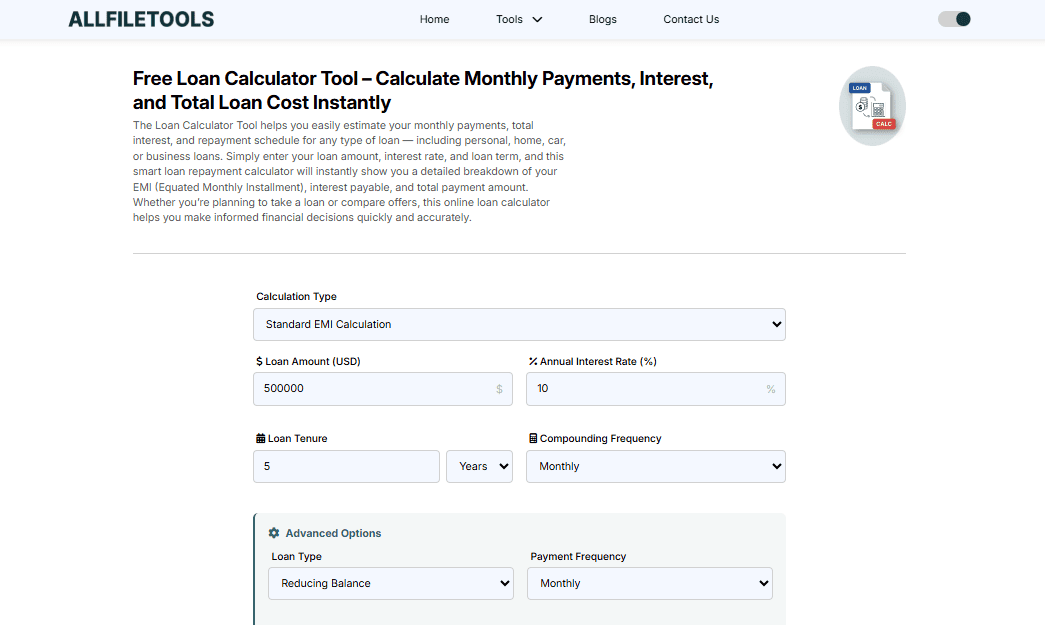
-
Visit the tool.
-
Enter your loan amount.
-
Choose your loan term (months or years).
-
Enter the interest rate.
-
Include optional fees if applicable.
-
Click calculate.
-
Review monthly payments, total interest, and total loan cost instantly.
-
Explore the amortization schedule to see principal vs interest each month.
-
Test prepayment or extra payments to see savings.
-
Plan your budget confidently.
Tips for Smart Loan Planning
-
Always know your monthly payment before borrowing.
-
Compare multiple lenders and offers using the tool.
-
Consider extra payments to pay off loans faster.
-
Keep track of total interest and loan cost to avoid surprises.
-
Use the calculator before signing any loan agreement.
How the Free Smart Loan Calculator Works

Using the Free Smart Loan Calculator is simple:
-
Enter Loan Amount: The total money you plan to borrow.
-
Choose Loan Term: The period over which you’ll repay the loan (months or years).
-
Input Interest Rate: The annual rate your lender charges.
-
Include Extra Fees (Optional): Some loans have origination fees or other costs.
After entering these details, the calculator instantly displays:
-
Monthly Payment: How much you need to pay every month.
-
Total Interest: The total interest you will pay over the life of the loan.
-
Total Loan Cost: The sum of your principal and interest payments.
The best part? You don’t need any technical knowledge—everything is presented in plain, understandable language.
Try the Free Loan Calculator Here
Key Features of the Free Smart Loan Calculator
This isn’t just any calculator. It’s packed with features to help you plan, understand, and optimize your loans.
1. Instant Calculation
No waiting, no confusion. The results appear immediately as you input data.
2. Amortization Schedule
See a month-by-month breakdown of your payments, including principal vs. interest, so you know exactly how your money is being used.
3. Total Loan Cost Overview
Not just your monthly payment—see the big picture, including total interest and overall cost.
4. Compare Multiple Loan Options
Test different interest rates, terms, or loan amounts to find the best option for your needs.
5. Prepayment Planning
Enter extra payments to see how they can reduce the term and interest of your loan.
6. User-Friendly Interface
No technical jargon. Designed for students, professionals, and general users, making complex loan math simple.
Why the Free Smart Loan Calculator is Better Than Others
Many online calculators exist, but here’s why this one stands out:
-
Completely Free: No hidden charges, signups, or software downloads.
-
All-In-One Tool: Works for personal, auto, student, and business loans.
-
Clear Results: Understand exactly what you’re paying each month and over the life of your loan.
-
Simple & Accessible: Designed for all audiences—technical or non-technical.
Practical Scenarios Using the Loan Calculator

Scenario 1: Personal Loan
Suppose you borrow $10,000 at 8% interest for 2 years. The calculator shows:
-
Monthly Payment: $452
-
Total Interest: $848
-
Total Loan Cost: $10,848
Without this tool, many borrowers might miscalculate and overpay.
Scenario 2: Auto Loan
A $20,000 car loan at 6% interest for 5 years:
-
Monthly Payment: $386
-
Total Interest: $3,160
-
Total Cost: $23,160
You can instantly see how changing the loan term or rate affects the monthly payment.
Scenario 3: Business Loan
Borrow $50,000 at 7% for 3 years:
-
Monthly Payment: $1,547
-
Total Interest: $5,692
-
Total Cost: $55,692
You can experiment with extra monthly payments to reduce interest and pay off faster.
Benefits of Using This Tool
-
Financial Clarity: Understand exactly how much you owe.
-
Budget Control: Avoid missed payments and late fees.
-
Comparison Made Easy: Evaluate multiple loan offers instantly.
-
Savings Opportunity: Plan prepayments to save on interest.
-
Time-Saving: Instantly get accurate calculations without manual math.
How to Make the Most of Your Loan Calculator
-
Always enter the exact loan amount and interest rate provided by your lender.
-
Test multiple scenarios—different loan terms, amounts, and rates.
-
Include optional fees if your loan has them.
-
Use the amortization breakdown to track principal vs. interest.
-
Plan extra payments to shorten loan duration and save money.
Conclusion
Imagine a world where you can plan your loan payments with zero confusion, no complicated math, and complete clarity on how much interest you’ll pay over time. That’s exactly what the Free Smart Loan Calculator does. Whether it’s a personal loan, auto loan, student loan, or business loan, this tool allows you to calculate monthly payments, total interest, and overall loan cost instantly. No need to stress over complex formulas or APR terms—just enter your loan details, and get clear results in seconds.
Using this tool helps you make smarter financial decisions, compare loan options, and even plan for early repayment to save money. Stop guessing your monthly obligations and start planning with confidence today. Try the Free Loan Calculator Now.
FAQs
1. What is a loan calculator?
A loan calculator is an online tool that helps you estimate monthly payments, total interest, and overall loan cost for any loan.
2. Can I use this calculator for any type of loan?
Yes! It works for personal loans, auto loans, student loans, mortgages, and business loans.
3. Is this calculator really free?
Absolutely. There are no hidden fees, signups, or downloads required.
4. How accurate are the calculations?
Very accurate. It uses standard formulas for loan payments and interest calculation.
5. Can I see a breakdown of principal vs. interest?
Yes! The tool provides a detailed amortization schedule for all loan types.
6. Can I compare two different loans?
Yes, you can enter different amounts, interest rates, or terms to see which loan is more cost-effective.
7. Will it help me plan prepayments?
Yes, you can enter extra payments to see how much faster you can pay off your loan and save on interest.
8. Do I need technical knowledge to use it?
No. The tool is designed for general users and is very easy to use.
9. Can students or business owners use it?
Yes, it’s perfect for students, developers, business owners, and anyone planning a loan.
10. Where can I access the tool?
You can access it here: Free Smart Loan Calculator.
Wrap-Up / Final Thoughts
Loans don’t have to be confusing. With the Free Smart Loan Calculator, you can instantly see your monthly payments, total interest, and total cost for any loan. Whether you’re a student, business owner, fintech enthusiast, or general user, this tool puts you in control of your finances.
No more guesswork, no more complicated math—just clear, easy-to-understand results. Make smarter financial decisions, compare loans, and plan for the future confidently.
Leave a Comment
No comments yet. Be the first to comment!