
In today’s digital era, images play a pivotal role in marketing, social media, blogging, and online branding. With millions of photos shared daily, protecting your intellectual property has become crucial. Whether you are a blogger, photographer, digital marketer, or business owner, preventing unauthorized use of your images is essential. This is where an Image Watermark Tool comes into play. It allows you to add text or logo watermarks to images online, ensuring your visuals remain uniquely yours while maintaining a professional appearance.
In this detailed guide, we’ll explore everything you need to know about using an image watermark tool, its features, benefits, use cases, and practical steps to protect your images effectively. By the end of this blog, you’ll be equipped to secure your digital content while enhancing your brand visibility.
What is an Image Watermark Tool?
An Image Watermark Tool is an online platform that allows users to overlay text or logos on their images. The purpose of watermarking is primarily to protect intellectual property, prevent unauthorized usage, and maintain brand recognition. Watermarks can vary in style, opacity, placement, and complexity depending on the tool you choose.
Key aspects of an image watermark tool include:
-
Text Watermarking: Adding custom text such as your name, brand, or copyright notice.
-
Logo Watermarking: Inserting your brand logo on images.
-
Batch Processing: Applying watermarks to multiple images simultaneously.
-
Customization Options: Adjusting font, size, color, opacity, rotation, and placement.
-
Online Accessibility: Using the tool without downloading any software, accessible via web browser.
By using an image watermark tool, content creators and businesses can protect their visual assets, maintain brand identity, and ensure that their images are recognizable even when shared widely.
Why Watermarking Your Images is Important

Watermarking is not just a protective measure; it also serves marketing and branding purposes. Here’s why it’s essential:
1. Protect Intellectual Property
Images represent hours of creativity and effort. A watermark ensures that your work cannot be easily copied or used without permission.
2. Brand Visibility
When you watermark your logo or brand name, your content becomes instantly recognizable across social platforms, websites, and marketing materials.
3. Discourage Unauthorized Use
A visible watermark discourages people from stealing or misusing your images because it signifies ownership and professionalism.
4. Professional Appearance
Adding a watermark can give your images a polished, professional look, making them suitable for portfolios, client presentations, and social media campaigns.
Features of a High-Quality Image Watermark Tool
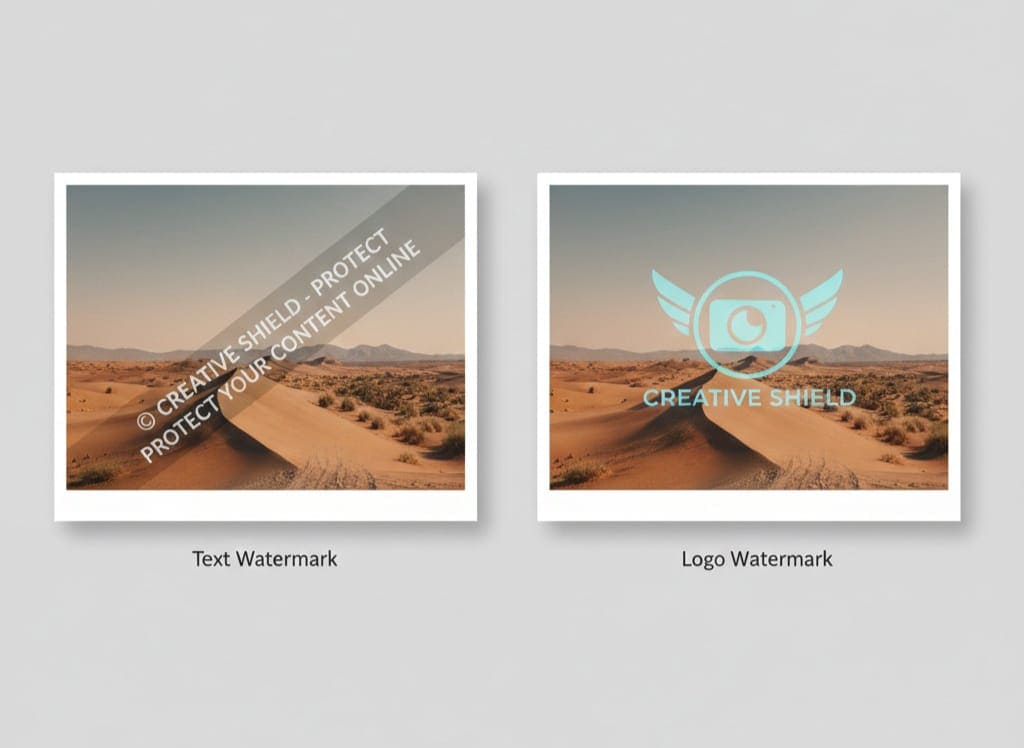
A powerful online watermark tool includes several key features. Understanding these features can help you choose the best tool for your needs.
1. Text and Logo Watermarking
The ability to add either text or logos is fundamental. Tools like AllFileTools Image Watermark Tool allow you to insert your brand name, copyright notice, or custom text directly on images.
2. Customization Options
Customization ensures that your watermark is both visible and non-intrusive. Features to look for include:
-
Font styles and sizes
-
Color options
-
Transparency/opacity settings
-
Placement (top-left, center, bottom-right, etc.)
-
Rotation and tilting
3. Batch Processing
If you handle large volumes of images, batch processing saves time by applying watermarks to multiple images simultaneously.
4. Online Accessibility
A true online tool works entirely on the web without requiring software installation. This is convenient for users across devices, including Windows, Mac, and even mobile.
5. Security & Privacy
Some online tools ensure that uploaded images are secure and deleted after processing, which is vital when handling sensitive or client work.
How to Use the Image Watermark Tool: Step-by-Step Guide
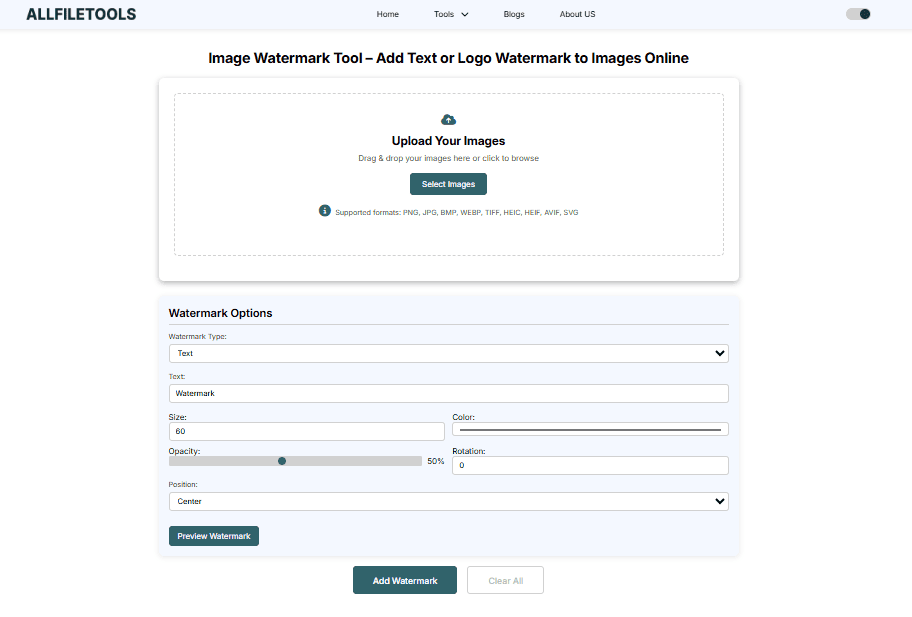
Using an image watermark tool is straightforward. Follow these steps for optimal results:
Step 1: Open the Tool
Visit AllFileTools Image Watermark Tool in your browser.
Step 2: Upload Your Image
Click Upload and select the image(s) you want to watermark. Most tools support formats like JPG, PNG, BMP, and GIF.
Step 3: Add Text or Logo
Choose between text watermark or logo watermark:
-
Text: Type your name, brand, or copyright notice.
-
Logo: Upload your brand logo in PNG format with transparency for a clean overlay.
Step 4: Customize Watermark
Adjust the watermark’s font, size, color, opacity, placement, and rotation. This ensures the watermark is visible but not distracting.
Step 5: Preview Your Image
Always preview the watermarked image to make sure it looks professional and is positioned correctly.
Step 6: Apply Watermark
Click Apply to embed the watermark on your image.
Step 7: Download Image
Once the watermark is applied, download the image to your device. Your image is now protected and ready to be shared.
Who Can Benefit from an Image Watermark Tool?

The tool is useful for a wide range of professionals and content creators.
1. Bloggers and Content Creators
Protect your original blog images from theft while keeping your brand visible online.
2. Photographers
Ensure your photos are credited properly when shared on social media or client portfolios.
3. Digital Marketers
Branding images for campaigns and social posts ensures consistent brand recognition.
4. Business Owners & Brands
Maintain ownership of promotional images, product photos, and marketing visuals.
5. Social Media Managers
Quickly watermark images before posting on Instagram, Facebook, or LinkedIn.
6. Developers & Designers
Protect design mockups, illustrations, or app visuals while sharing with clients.
7. Students & General Users
Even non-professional users can protect their personal images from unauthorized sharing.
Benefits of Using an Online Image Watermark Tool
Here’s why using a dedicated online tool is superior to manual watermarking in software like Photoshop:
-
Ease of Use: No technical skills required.
-
Fast Processing: Watermark multiple images quickly.
-
Cross-Platform Accessibility: Works on any browser and device.
-
Cost-Effective: Free or affordable compared to premium software.
-
Professional Results: Clean, customizable watermarks for polished visuals.
High-Volume SEO Keywords for Image Watermark Tool

Here’s a curated list of keywords to target in your blog for maximum SEO impact:
Primary Keywords
-
Image Watermark Tool
-
Add Watermark to Image Online
-
Logo Watermark Tool
-
Text Watermark Tool
Secondary / Long-Tail Keywords
-
How to add watermark to images online
-
Free image watermark tool for bloggers
-
Online tool to watermark photos with logo
-
Protect images with watermark online
-
Batch image watermark online free
Technical Terms
-
Transparency / Opacity
-
Batch processing
-
PNG / JPG watermark
-
Logo overlay
-
Watermark placement
Feature-Related Keywords
-
Custom font watermark
-
Logo watermark position
-
Text watermark color
-
Rotate watermark
-
Download watermarked image
Other Related Keywords
-
Protect images online
-
Prevent image theft
-
Brand your photos
-
Online watermark generator
-
Free watermark app
By integrating these keywords naturally throughout the blog, your post will rank better for users searching for image watermark tools online.
Tips for Effective Image Watermarking

-
Keep it subtle but visible: Avoid overpowering your image.
-
Position strategically: Place the watermark in a corner or along the edge.
-
Maintain consistency: Use the same font, size, and style across all images.
-
Use logos when possible: Enhances brand recognition.
-
Batch watermarking: Saves time when processing multiple images.
Step-by-Step Video or Demo Integration
If you are creating a tutorial, consider embedding a video demo showing:
-
Uploading the image
-
Adding text or logo
-
Customizing opacity and position
-
Downloading the final image
This increases engagement and helps users understand your tool better.
Conclusion
Protecting your images online is no longer optional—it’s essential. Using an Image Watermark Tool allows you to secure your photos, maintain brand visibility, and prevent unauthorized use effortlessly. Whether you are a blogger, photographer, digital marketer, business owner, or student, adding watermarks ensures your content remains yours while looking professional and polished.
With features like text and logo watermarking, batch processing, and online accessibility, tools like AllFileTools Image Watermark Tool make the process fast, easy, and effective. Start watermarking your images today and protect your digital creations with confidence.
🔹 Explore more powerful file conversion and online utilities at AllFileTools –
🔹 For technical support, digital solutions, and expert services, visit LetDigitalFly IT Services –
🔹 Discover additional career and productivity resources at Resume Slip Builder –
Frequently Asked Questions (FAQs)
1. What is an image watermark tool?
An image watermark tool is an online platform that allows you to add text or logo overlays to images to protect them from unauthorized use.
2. Can I watermark multiple images at once?
Yes, many tools support batch processing, allowing you to watermark multiple images in a single step.
3. Is the watermark tool free to use?
Yes, AllFileTools Image Watermark Tool is free, secure, and accessible online without installing software.
4. Can I customize the watermark’s opacity and position?
Absolutely. You can adjust transparency, color, font, size, and placement to make your watermark visible but not distracting.
5. Does watermarking reduce image quality?
No, high-quality watermark tools maintain the original resolution of your images while adding the watermark.
6. Can I use my logo as a watermark?
Yes, you can upload PNG logos with transparency to overlay on images professionally.
7. Which image formats are supported?
Most online watermark tools support JPG, PNG, BMP, and GIF formats, making it versatile for different projects.
Leave a Comment
No comments yet. Be the first to comment!