
Buying a home is one of the most significant financial decisions you’ll ever make. Understanding your mortgage payments, interest, and amortization schedule is essential to plan your finances effectively. With so many variables involved—loan amount, interest rates, loan term, taxes, insurance, and extra payments—it’s easy to feel overwhelmed. This is where a Mortgage Calculator becomes an indispensable tool for first-time home buyers, real estate investors, homeowners, finance beginners, and anyone planning to take a mortgage.
In this comprehensive guide, we’ll explore how a mortgage calculator works, the benefits of using it, step-by-step instructions on calculating your home loan, understanding amortization, and maximizing your financial planning. Plus, we’ll introduce our powerful Mortgage Calculator that instantly calculates payments, interest, and amortization.
What is a Mortgage Calculator?
A Mortgage Calculator is an online tool designed to estimate your monthly mortgage payments, including principal, interest, taxes, insurance, and other costs. By inputting loan details like home price, down payment, loan term, and interest rate, the calculator generates accurate figures for your monthly obligations. Some advanced calculators also provide a detailed amortization schedule that breaks down each payment into principal and interest components over time.
Using a mortgage calculator helps you:
-
Understand how much home you can afford
-
Plan monthly budgets effectively
-
Explore different mortgage scenarios
-
Compare loans with varying interest rates and terms
-
Make informed decisions about extra payments and refinancing
Why Using a Mortgage Calculator is Essential

Buying a home is more than just choosing a property; it’s about financial planning. Here are key reasons why using a mortgage calculator is crucial:
1. Accurate Financial Planning
With a mortgage calculator, you can estimate your monthly payment accurately, including principal, interest, taxes, insurance, and even PMI (Private Mortgage Insurance). This ensures that you know exactly how much you’ll need to budget each month.
2. Compare Loan Scenarios
A mortgage calculator allows you to compare different loan options. For example:
-
A 15-year loan vs. a 30-year loan
-
Fixed-rate vs. adjustable-rate mortgages
-
Different down payment amounts
You can instantly see which scenario works best for your financial situation.
3. Understand Amortization
Amortization refers to how your loan balance is reduced over time through payments. A mortgage calculator provides a detailed amortization schedule, showing how much of each payment goes toward principal versus interest. This insight helps in planning extra payments to reduce overall interest.
4. Save Time and Reduce Errors
Manual mortgage calculations can be complex and prone to errors. Using a reliable mortgage calculator ensures accuracy and saves time, letting you focus on choosing the right property.
Key Features of Our Mortgage Calculator
Our Mortgage Calculator is designed for both beginners and finance professionals. Here are the main features:
-
Instant Payment Calculation: Enter your loan details and get instant monthly payment figures.
-
Detailed Amortization Schedule: Break down every payment into principal and interest.
-
Extra Payment Options: Include extra monthly or yearly payments to reduce loan duration.
-
Property Taxes and Insurance: Factor in PITI (Principal, Interest, Taxes, Insurance) for realistic estimates.
-
User-Friendly Interface: Easy-to-use inputs suitable for beginners and advanced users.
-
Data Visualization: Charts and graphs for quick insights on your mortgage progress.
Step-by-Step Guide: How to Calculate Your Mortgage Payments

Using a mortgage calculator is simple. Follow these steps:
Step 1: Enter the Home Price
Input the purchase price of the property you intend to buy. For example, $350,000.
Step 2: Input the Down Payment
The down payment is the initial amount you pay upfront. For example, a 20% down payment on $350,000 is $70,000.
Step 3: Specify the Loan Term
Select the loan duration. Common terms include 15 years, 20 years, and 30 years. Shorter terms usually have higher monthly payments but lower total interest.
Step 4: Enter the Interest Rate
Provide the mortgage interest rate (annual percentage). For example, 6.5%.
Step 5: Include Taxes and Insurance
Many calculators allow you to add property taxes and homeowners insurance to get the total monthly payment (PITI).
Step 6: Add Extra Payments (Optional)
Include extra payments per month or year to accelerate loan payoff and save on interest.
Step 7: Calculate and Review Results
Click calculate. The calculator will generate:
-
Monthly payment breakdown
-
Total interest paid over the loan term
-
Amortization schedule showing principal vs. interest
-
Optional charts showing payment trends
Pro Tip: Always use our Mortgage Calculator for instant, accurate results without manual errors.
Understanding Your Amortization Schedule
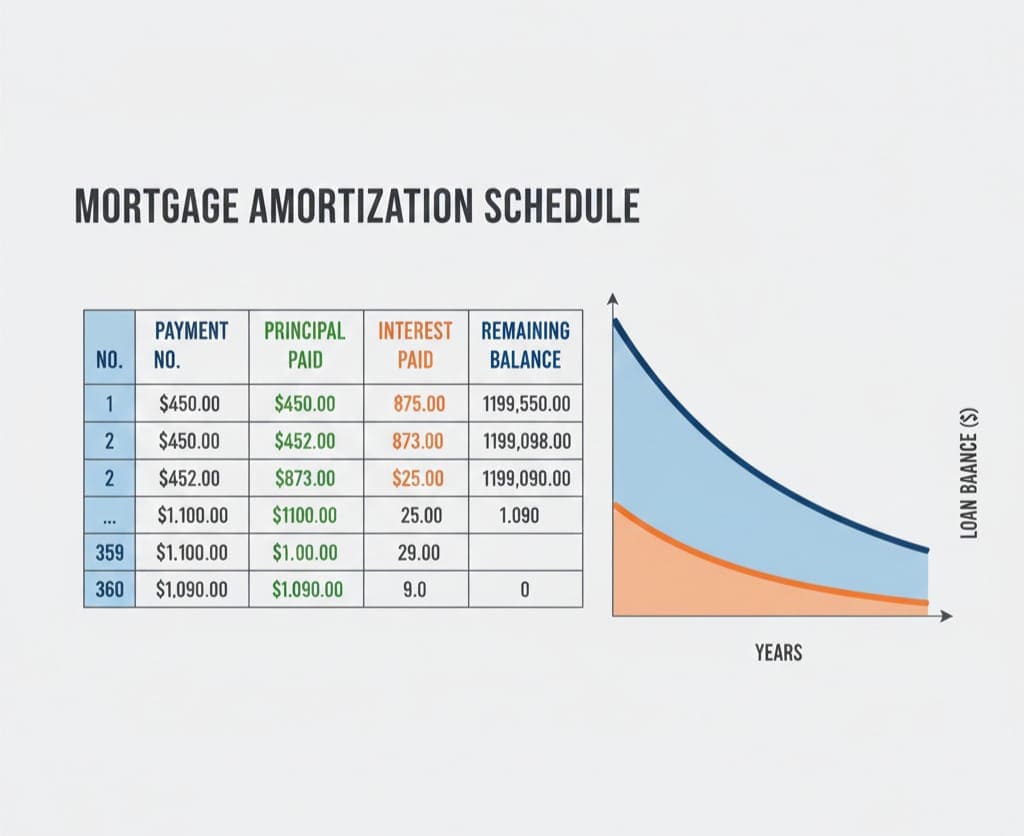
An amortization schedule shows how your mortgage is repaid over time. Each payment reduces the loan balance (principal) and pays interest. Early payments are mostly interest, while later payments contribute more to principal.
Key Components of an Amortization Schedule
-
Payment Number: Sequential number of each monthly payment
-
Principal Paid: Portion of payment that reduces loan balance
-
Interest Paid: Portion of payment applied to interest
-
Remaining Balance: Outstanding loan amount after each payment
Example Table:
| Payment # | Principal Paid | Interest Paid | Remaining Balance |
|---|---|---|---|
| 1 | $500 | $1,000 | $349,500 |
| 2 | $502 | $998 | $348,998 |
| 3 | $504 | $996 | $348,494 |
Using an amortization schedule helps you plan extra payments and see long-term financial impact.
How Extra Payments Affect Your Mortgage

Making additional payments toward principal reduces the loan balance faster. Benefits include:
-
Reduced total interest paid
-
Shorter loan term
-
Increased equity in your home
Example Scenario:
-
Loan: $350,000, 30 years, 6.5% interest
-
Monthly payment: $2,211
-
Extra $200/month payment reduces loan term by 5 years and saves ~$30,000 in interest
Using our Mortgage Calculator, you can simulate different extra payment strategies easily.
Common Mortgage Types and Their Calculations

-
Fixed-Rate Mortgage (FRM)
-
Interest rate remains constant throughout the loan term
-
Predictable monthly payments
-
Easier to plan budgets
-
-
Adjustable-Rate Mortgage (ARM)
-
Interest rate changes periodically based on index rate
-
Lower initial payments, but future payments may vary
-
Use calculator to model rate changes
-
-
Interest-Only Mortgage
-
Only interest is paid initially; principal repayment starts later
-
Lower early payments, higher long-term costs
-
-
FHA / VA / USDA Loans
-
Government-backed programs with lower down payments
-
Calculator can include PMI, insurance, or funding fees
-
Tips for First-Time Home Buyers

-
Know your budget: Include taxes, insurance, and maintenance
-
Plan extra payments: Reduce interest over time
-
Compare lenders: Different interest rates, fees, and terms
-
Use a mortgage calculator: Instant calculations reduce financial uncertainty
Our Mortgage Calculator is perfect for first-time buyers to visualize costs and plan effectively.
How Real Estate Investors Use Mortgage Calculators
Investors can estimate cash flow, ROI, and property affordability:
-
Input rental income and expenses
-
Calculate net monthly cash flow
-
Compare multiple properties
-
Plan financing strategy for investment portfolios
A mortgage calculator helps investors evaluate properties quickly and make data-driven decisions.
Benefits for Finance Beginners
-
Educational: Understand mortgage components
-
Visual: Charts and amortization schedules
-
Practical: Simulate different payment plans
-
User-Friendly: Step-by-step guidance without confusion
Even beginners can make smart financial decisions by using our calculator.
Step-by-Step Example: Using the Tool
Let’s say you want to buy a house worth $400,000:
-
Home Price: $400,000
-
Down Payment: $80,000 (20%)
-
Loan Term: 30 years
-
Interest Rate: 6.5%
-
Taxes & Insurance: $300/month
-
Extra Payments: $150/month
By entering these into Mortgage Calculator:
-
Monthly Payment: ~$2,390
-
Total Interest Paid: ~$343,000
-
Loan Payoff: 30 years (can shorten with extra payments)
-
Amortization table shows detailed month-by-month breakdown
Conclusion
A Mortgage Calculator is an essential tool for anyone planning to buy a home, invest in real estate, or manage their finances. It helps you:
-
Accurately estimate monthly payments
-
Understand interest and principal contributions
-
Explore different loan scenarios
-
Plan extra payments to save money and time
Our Mortgage Calculator provides an easy, professional, and accurate solution for all your mortgage calculations. Whether you’re a first-time buyer, investor, or finance beginner, this tool makes mortgage planning simple and effective.
Frequently Asked Questions (FAQs)
1. What is a mortgage calculator?
A mortgage calculator is an online tool that estimates monthly payments, including principal, interest, taxes, insurance, and PMI. It helps buyers plan their budget and understand loan repayment schedules.
2. How accurate are mortgage calculators?
Calculators provide estimates based on the information entered. For precise numbers, consider exact interest rates, taxes, insurance, and fees. Our tool provides highly accurate results and amortization schedules.
3. Can I include extra payments in my mortgage calculation?
Yes, most advanced calculators, including ours, allow you to input extra monthly or yearly payments, which helps reduce loan term and total interest paid.
4. What is an amortization schedule?
An amortization schedule breaks down each mortgage payment into principal and interest over time. It shows how the loan balance decreases and helps plan extra payments.
5. Can I calculate taxes and insurance using a mortgage calculator?
Yes, our Mortgage Calculator allows you to include property taxes, homeowners insurance, and HOA fees for an accurate monthly payment estimate.
6. Is the mortgage calculator suitable for first-time home buyers?
Absolutely. The tool is beginner-friendly, easy to use, and provides clear insights into payments, amortization, and total costs.
7. Can investors use this calculator for rental properties?
Yes, real estate investors can input property values, loan amounts, and expected rental income to calculate cash flow, ROI, and compare investment scenarios.
Leave a Comment
No comments yet. Be the first to comment!