
In life, time flies — and sometimes, it flies so fast that we lose track of it. Ever wondered exactly how much time you spent on a project, between two events, or even on that Netflix marathon last weekend? Whether you’re a student trying to track study sessions, a developer debugging time intervals, a business professional planning meetings, or an accountant calculating billable hours — accurate time calculation matters.
This is where a Time Duration Calculator becomes your best friend — a helpful, no‑nonsense tool that tells you the precise time difference between two dates or times instantly. No more brain gymnastics, scribbling on paper, or flawed manual calculations!
In this blog, we’ll dive deep into what a time duration calculator does, how it works, how to use it effectively, real‑world examples, why it’s so useful, and exactly how your time can be quantified correctly in hours, minutes, and even seconds.
👉 Try the tool here: https://www.allfiletools.com/time-duration-calculator/
🕒 What Is a Time Duration Calculator?
Simply put, a Time Duration Calculator is an online tool that instantly figures out the exact time that has passed between two timestamps — whether those timestamps are two times on the same day or dates that span weeks, months, or even years.
Unlike manual calculations, which are prone to error (especially with AM/PM conversions, day changes, or time zone confusion), this tool does all the work accurately and quickly. It’s designed to be user‑friendly and reliable so anyone — from students to professionals — can use it without headaches. TD Calculator+1
📌 Why This Tool Is So Important
Before computers, people used sticky notes, calendars, or mental math to calculate time differences. That led to mistakes like:
-
Counting hours wrong because of AM/PM confusion
-
Forgetting to include minutes or seconds
-
Not accounting for changes in days or crossing midnight
A Time Duration Calculator eliminates these mistakes. Here’s why it’s essential:
✔ Believe Results, Not Guesswork
Manual subtraction doesn’t always reveal total duration accurately — especially when it involves seconds or crosses over midnight.
✔ Works for Any Audience
From students tracking study hours to developers needing precise timestamps in logs, this tool satisfies a wide spectrum of needs.
✔ Saves Time and Effort
Just plug in the start and end date/time, and instantly get the total duration in hours, minutes, seconds, and even days.
⏱️ How It Works: Step‑by‑Step
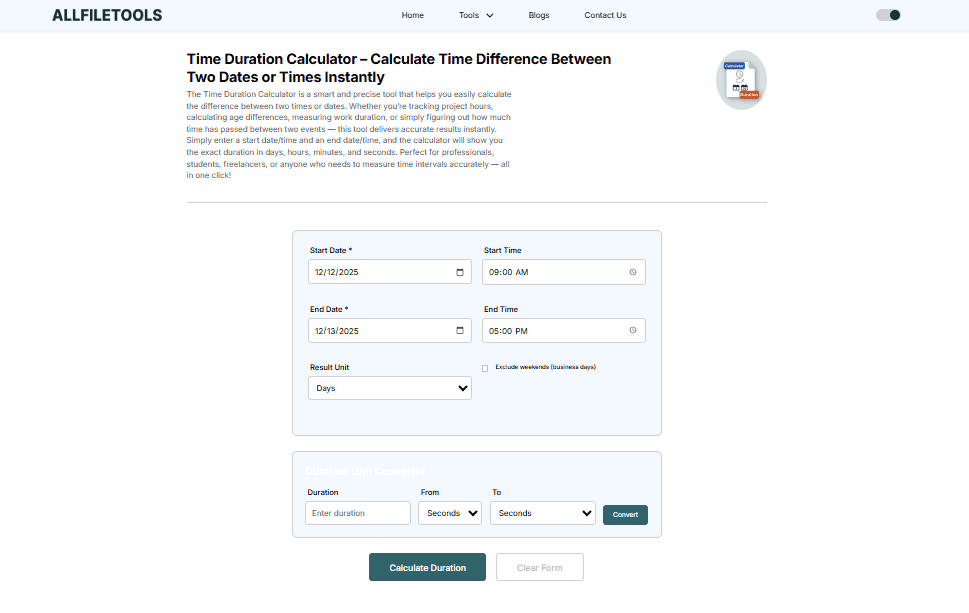
Using a Time Duration Calculator could not be simpler. Here’s the exact process you follow:
1. Enter the Start Date and Time
Begin by selecting when your event or period starts — including date and time (AM/PM or 24‑hour format).
2. Enter the End Date and Time
Now select when it ends.
3. Click “Calculate”
Just press the calculate button, and you’ll get the total duration displayed instantly. TD Calculator
Your result might look like:
-
Days: 5
-
Hours: 13
-
Minutes: 42
-
Seconds: 18
This is especially helpful in scenarios like project timelines, time tracking, or billing hours. Free Math Tools
💡 Fun fact: Most calculators also handle overnight calculations — like from 11:30 PM to 2:15 AM — which is tricky to do manually. TD Calculator
🧠 Understanding Time Difference: The Math Behind It
Let’s make this real with an example.
Example: Freelancer Work Hours
You logged in to work at 9:15 AM and logged out at 5:45 PM. How long did you work?
Instead of manually breaking out pen and calculator:
-
Enter
9:15 AMas Start Time -
Enter
5:45 PMas End Time -
Hit Calculate
Result: 8 hours 30 minutes — instantly! Jibble
Another Example: Event Duration Across Days
Suppose a design workshop started on June 1 at 8:30 AM and ended on June 3 at 4:15 PM.
Instead of complex calculation, the tool tells you:
-
2 days
-
7 hours
-
45 minutes
In seconds — too! Free Math Tools
These examples show that whether you’re dealing with hours or days, the calculator simplifies what would otherwise be a tedious task.
📌 Real‑Life Uses of a Time Duration Calculator

This nifty tool isn’t just for quick curiosity — it’s packed with real‑world uses.
🎓 Students
Track how many hours you spent on exam preparation or assignments.
👩💼 Business Professionals
Calculate the duration of meetings, shifts, or project milestones.
👨💻 Developers & Coders
Measure execution time between code runs or server logs.
🧮 Accountants & Analysts
Calculate billable time accurately, improving payroll and billing accuracy.
🌍 Everyday Users
Whether planning trips or tracking workouts — get precise time gaps effortlessly.
Across all these use cases, the calculator brings accuracy where human calculation struggles. TD Calculator
📊 Benefits of Using Your Time Duration Calculator

Let’s look at the advantages of making this tool part of your workflow:
1. Instant and Accurate
No human error; results are precise down to the second. Jibble
2. No Registration Required
Use it right away without signing up.
3. Works Anywhere
Desktop, mobile — wherever you are. TD Calculator
4. Supports Multiple Formats
Calculate across hours, minutes, seconds, or even days. Calculator Wall
🔍 Use Cases Where This Tool Shines
Let’s break down some times you’ll really appreciate having this calculator:
🗓️ Project Deadlines
Avoid estimating time — instead compare start and end dates to get exact durations.
🧑💻 Coding Time Blocks
Developers need to analyze execution times down to milliseconds sometimes — and this helps visualize that.
✈️ Travel Itineraries
Know if your layover time is enough before that connecting flight.
⏰ Work Hour Tracking
HR teams love it: accurate durations help with payroll and attendance.
All these scenarios show that a time duration calculator isn’t just useful — sometimes essential. Free Math Tools
💡 Tips for Better Use
Here are a few clever ways to use this calculator:
⏱ Track Study Blocks
Log study start and end times — and watch your productivity jumps.
🧮 Measure Break Time
Between meetings or tasks, calculate how long your breaks really are.
📆 Plan Future Events
Figure out exactly how long you have between now and your next deadline.
…
(Start implementing these tips and you’ll notice you plan your day with way more confidence!)
🛠 How This Tool Compares to Manual Calculation
Manual time calculations often involve:
-
Pen and paper
-
Spreadsheet formulas
-
Guesswork with AM/PM
But the calculator automates all that — making time math something you don’t dread anymore. Jibble
📝 Story: How the Tool Saved My Day
Last month, I tried calculating overtime for a project manually. I was pretty confident — until I realized I miscounted minutes because of an overnight time span. Ten minutes turned into a big headache. Then I turned to a Time Duration Calculator.
Three clicks later:
-
Exact total time down to minutes and seconds
-
No math mistakes
-
Saved hours of frustration
That’s the magic of using the right tool.
📌 Step‑By‑Step Guide: Using the Time Duration Calculator
Here’s a quick guide you can follow:
-
Open the calculator at the link: https://www.allfiletools.com/time-duration-calculator/
-
Input the start date and time.
-
Input the end date and time.
-
Click “Calculate.”
-
Instantly see the exact difference in your chosen units.
It’s as easy as that.
✨ Common Mistakes to Avoid

Even though the tool is intuitive, beginners sometimes:
-
Forget to set AM/PM correctly
-
Forget to include the date when spanning over multiple days
-
Try manual subtraction instead of using the calculator
Avoid these and you’ll love how smooth time calculations become!
🪄 Pro Tips for Professionals
-
Use this tool to calculate billable hours precisely.
-
Use results in productivity tracking or timesheet reports.
-
Combine it with calendar planning apps to streamline scheduling.
Conclusion
Time is precious — so don’t waste it on complex manual calculations or confusing formulas. Whether you’re tracking work hours, planning events, debugging code, or just curious about how long something took, a Time Duration Calculator gives you accurate results instantly.
No sign‑ups, no ads, just precise time intervals broken down into hours, minutes, and seconds — it’s the simplest way to understand time exactly how it happened.
📌 Try it now: https://www.allfiletools.com/time-duration-calculator/
Frequently Asked Questions (FAQs)
1. What is a time duration calculator?
A time duration calculator is an online tool used to find the exact difference between two dates and times — showing results in days, hours, minutes, and seconds.
2. Can it calculate time across midnight?
Yes — most advanced calculators handle crossing midnight accurately, showing correct total duration.
3. Do I need to sign up to use the tool?
No, tools like the one at AllFileTools can be used instantly without registration.
4. Is this useful for professionals?
Absolutely — it’s ideal for project managers, accountants, developers, and anyone tracking precise time data.
5. How does this differ from manual calculation?
Manual calculation relies on memory and math — the tool performs accurate computation instantly across multiple units.
6. Can I calculate time between two dates and times?
Yes — you can input both date and time for start and end to get full duration.
7. Is the tool free?
Yes, most online time duration calculators are free to use without limits.
Leave a Comment
No comments yet. Be the first to comment!