PDF files are widely used for sharing reports, presentations, contracts, and academic documents. However, many PDFs contain extra pages, blank pages, or outdated sections that need to be removed before sharing.
Instead of installing heavy software, you can now delete pages from a PDF online using simple browser-based tools. These tools allow you to upload your file, select unwanted pages, and download a cleaned version in just a few clicks.
For example, you can quickly remove pages using the AllFileTools PDF Page Remover:
https://www.allfiletools.com/delete-pdf-pages/
Most online PDF page removers follow a simple process:
- Upload your PDF file
- Select the pages you want to delete
- Generate the updated PDF
- Download the edited document
In this article, we will explore the top tools to delete pages from a PDF online, comparing their ease of use, speed, and additional features.
1. AllFileTools PDF Page Remover (Best Overall)
Tool: https://www.allfiletools.com/delete-pdf-pages/
The AllFileTools PDF Page Remover is one of the easiest and fastest tools available for removing unwanted pages from PDF documents. It is designed with simplicity in mind, making it suitable for beginners as well as professionals who need a quick solution.
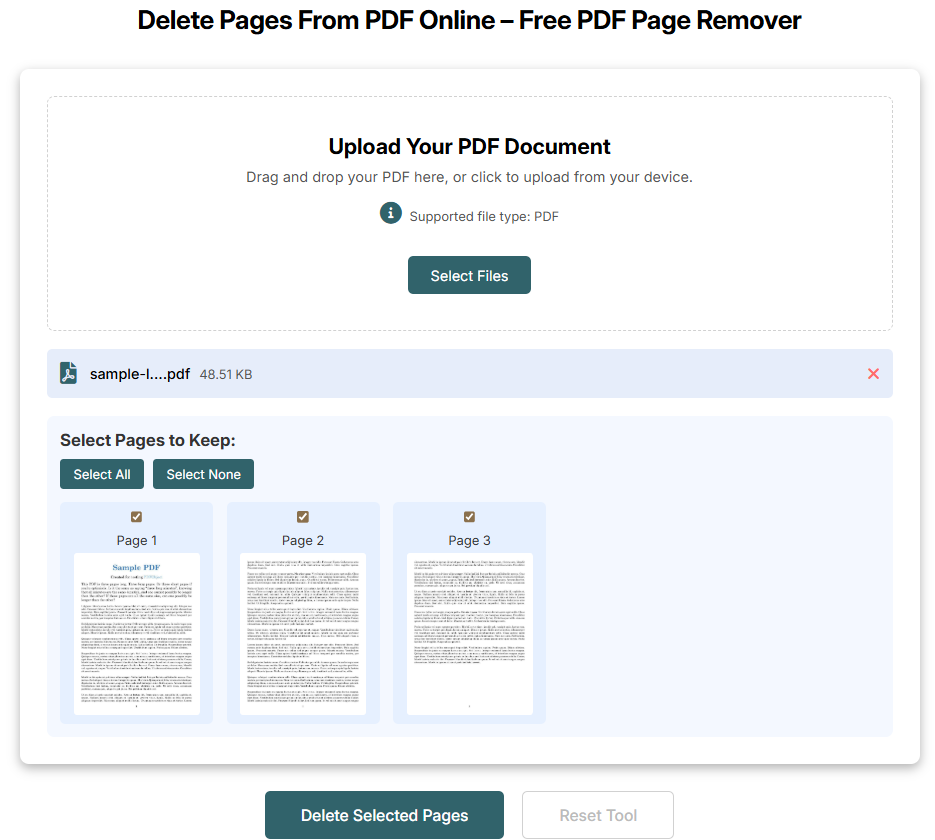
Unlike many online editors that require you to manually type page numbers or ranges, this tool provides a visual editing interface with page previews, allowing you to see exactly what you are removing from the document.
Because the tool runs completely in the browser, users do not need to install software or create an account. The process is straightforward and takes only a few seconds.
Key Features
- Visual thumbnail preview of every page
- Simple drag-and-drop file upload
- Delete multiple pages at once
- Works on desktop, tablet, and mobile devices
- No installation or registration required
- Secure file processing and privacy protection
How It Works
Using the tool is extremely simple:
- Upload your PDF file from your device.
- Wait for the system to generate page previews.
- Select the pages you want to remove.
- Click the remove button and download the updated PDF.
Why It Stands Out
The biggest advantage of this tool is its user-friendly interface and speed. Users can visually identify pages and remove them instantly without guessing page numbers. This makes it particularly useful for students, business professionals, and designers who regularly edit PDF files.
2. Smallpdf
Smallpdf is one of the most popular PDF platforms available today. It provides a full suite of PDF tools, including the ability to organize, rearrange, and delete pages from PDF documents.
The platform has gained a large user base because of its clean interface and reliable performance. The page organizer feature allows users to drag and drop pages, rotate them, or delete them before generating the final file.
Key Features
- Drag-and-drop page organization
- Remove or reorder pages easily
- Works on all modern browsers
- Supports multiple devices
- Secure file transfers with encrypted connections
Smallpdf is commonly used by professionals because it provides a complete ecosystem of PDF tools, including compression, conversion, and editing capabilities.
3. iLovePDF
I love pdf is another widely known platform for managing and editing PDF files online. It includes a dedicated tool that allows users to remove pages from PDFs quickly and easily.
The platform is known for its fast processing and ability to handle multiple types of PDF tasks, including merging files, splitting documents, compressing PDFs, and converting them into other formats.
Key Features
- Delete individual pages or page ranges
- Simple and intuitive interface
- Free online editing
- Works on mobile devices and desktops
- Automatic file deletion for privacy
Many users prefer i love pdf because it offers multiple document management features in one place, making it useful for both personal and professional workflows.
4. Sejda PDF Editor
Sejda is a versatile PDF editor that allows users to edit, modify, and organize PDF documents online. Its page deletion tool lets users remove unwanted pages directly from the document preview interface.
One of the unique aspects of Sejda is that it also provides advanced editing features, such as editing text, filling forms, and adding annotations.
Key Features
- Visual page preview interface
- Secure encrypted file uploads
- Online and desktop versions available
- Integration with Google Drive and Dropbox
- Automatic file deletion after processing
Sejda is particularly useful for users who want more advanced editing capabilities beyond simply deleting pages.
5. PDF24 Tools
PDF24 Tools is a free platform that offers a variety of online utilities for editing and managing PDF documents. Its page removal tool allows users to quickly upload a document, remove specific pages, and download the updated file.
The platform focuses on simplicity and accessibility, making it suitable for users who need a quick solution without complex settings.
Key Features
- Completely free to use
- Supports all major operating systems
- No software installation required
- Maintains original document formatting
- Simple page selection interface
PDF24 Tools is ideal for users who prefer a straightforward and free PDF editing solution.
Benefits of Using Online PDF Page Remover Tools
Online PDF tools have become increasingly popular because they offer several advantages compared to traditional software.
No Installation Required
Most online tools work directly in your browser, which means you do not need to download or install any software.
Faster Editing
Online tools typically process files quickly, allowing you to edit and download documents in seconds.
Cross-Platform Compatibility
These tools work on Windows, Mac, Linux, Android, and iOS, making them accessible from almost any device.
Easy User Interface
Many platforms offer visual page previews, making it easy to select and remove pages without confusion.
How to Choose the Best PDF Page Remover
If you frequently work with PDF documents, choosing the right tool can save you time and effort. Here are a few important factors to consider.
Ease of Use
The best tools provide a simple interface with clear page previews and easy selection options.
Security and Privacy
Always choose platforms that use encrypted file transfers and automatically delete uploaded files after processing.
File Compatibility
Make sure the tool supports large PDF files and maintains original formatting.
Additional Features
Some tools offer extra functionality such as:
These features can be helpful if you regularly manage multiple documents.
Final Thoughts
Removing unnecessary pages from a PDF file no longer requires expensive software or complicated editing programs. With modern browser-based tools, you can clean up your documents in just a few seconds.
Among the many options available online, the AllFileTools PDF Page Remover stands out because of its simple interface, visual page preview system, and quick processing speed. It provides an efficient solution for anyone who wants to delete pages from PDF files without dealing with complex settings.
However, tools like Smallpdf, iLovePDF, Sejda, and PDF24 Tools also offer reliable solutions depending on your needs and preferences.
By using one of these tools, you can easily keep your PDF documents organized, professional, and ready to share.
Frequently Asked Questions
How do I delete pages from a PDF file online?
To delete pages from a PDF online, upload your document to a PDF page remover tool, select the pages you want to remove, and download the updated PDF file.
Is it possible to remove pages from a PDF without Adobe Acrobat?
Yes. Many online tools allow you to remove pages from PDFs without installing Adobe Acrobat or any other software.
Are online PDF editing tools safe?
Most reputable tools use encrypted connections and automatically delete files after processing. However, it is always recommended to avoid uploading highly sensitive documents.
Can I delete multiple pages from a PDF at once?
Yes. Most online PDF tools allow you to select and delete multiple pages simultaneously.
Will removing pages affect the formatting of my PDF?
No. Removing pages does not change the formatting of the remaining pages. The layout, images, and text remain intact.
Can I remove blank pages from a PDF?
Yes. If your document contains blank pages, you can easily delete them using a page preview feature in most PDF editing tools.
Do these tools work on mobile devices?
Yes. Most online PDF tools are compatible with smartphones and tablets, allowing you to edit documents from any device.
Do I need to create an account to use these tools?
Many tools allow you to edit PDF files without creating an account, although some platforms may offer additional features for registered users.
🔹 Explore more powerful file conversion and online utilities at AllFileTools
🔹 For technical support, digital solutions, and expert services, visit LetDigitalFly IT Services
🔹 Discover additional career and productivity resources at Resume Slip Builder


Leave a Comment
No comments yet. Be the first to comment!