
In an era where every click is tracked and every message is monitored, the quest for true digital privacy has never been more intense. While most people turn to encryption to protect their data, there is a more subtle, ancient, and fascinating technique making a massive comeback in the digital world: Steganography.
If encryption is like putting your message in a locked iron safe, steganography is like hiding that message in plain sight—so well that no one even knows a safe exists. In this guide, we will dive deep into how you can use steganography tools to hide and extract secret messages in everyday files like Images and PDFs.
What is Steganography? (The Art of Invisible Communication)
The word "Steganography" comes from the Greek words steganos (covered) and graphein (to write). Unlike cryptography, which scrambles a message so it becomes unreadable, steganography hides the very existence of the message.
Imagine a spy movie where a secret agent leaves a mark on a brick wall. To a passerby, it’s just a smudge. To the recipient, it’s a set of coordinates. In the digital world, we do the same thing using Carrier Files like JPEGs, PNGs, and PDFs.
Why Use Steganography in 2026?
-
Avoiding Suspicion: Encrypted files (like .zip or .pgp) scream "I have a secret!" Steganographic images look like normal vacation photos.
-
Bypassing Censorship: In regions where certain apps or topics are banned, hiding data in memes or documents is a vital way to share information.
-
Copyright Protection: Photographers often hide "Digital Watermarks" inside their photos using steganography to prove ownership if the image is stolen.
How Steganography Works: Under the Hood
To understand how a steganography tool works, we need to look at how computers "see" files.
1. The LSB (Least Significant Bit) Method
Most digital images are made of pixels. Each pixel is composed of three colors: Red, Green, and Blue (RGB). Each color has a value (usually 0 to 255). Steganography tools slightly tweak the very last bit (the Least Significant Bit) of these values.
For example, if a pixel's blue value is 180 (binary 10110100) and the tool changes it to 181 (10110101), the change is so tiny that the human eye cannot distinguish the difference. By doing this across thousands of pixels, you can hide paragraphs of text or even another small image.
2. Metadata Hiding
Every PDF or Image has "Metadata"—data about the data. This includes the camera model, the date it was taken, or the author of the PDF. Tools can inject secret strings of text into these hidden fields.
Top Steganography Tools for Images
If you are ready to start hiding messages, here are the most reliable tools available today:
1. Steghide (Best for Security)
Steghide is an open-source tool that is a favorite among cybersecurity professionals. It supports JPEG, BMP, WAV, and AU files.
-
Pros: Uses encryption (AES) alongside steganography; very hard to detect.
-
Cons: Command-line based (no buttons, you have to type commands).
2. OpenStego (Best for Beginners)
This is a Java-based tool with a very simple "Point and Click" interface.
-
How it works: You select your "Cover File" (the photo), your "Message File" (the secret), and set a password. It generates a new "Stego-file" instantly.
3. Manytools & Online Converters
For those who don't want to download software, online web-tools allow you to upload an image and embed text directly. However, use these cautiously—never upload highly sensitive passwords to a website you don't own.
Hiding Secret Data in PDF Files
PDFs are unique because they aren't just one image; they are a collection of text, fonts, and graphics. This makes them excellent "carriers."
Methods for PDF Steganography:
-
White Space Manipulation: Tools can add extra spaces at the end of lines or between words. To a reader, it looks normal, but a tool can translate those spaces into binary code.
-
Hidden Layers: Just like in Photoshop, a PDF can have layers that are set to "Invisible." A steganography tool can place a text box in a layer that is never rendered by standard PDF viewers like Adobe Acrobat.
-
Font Embedding: You can hide data within the font description files embedded inside the PDF.
Step-by-Step: How to Hide a Message (The Human Way)
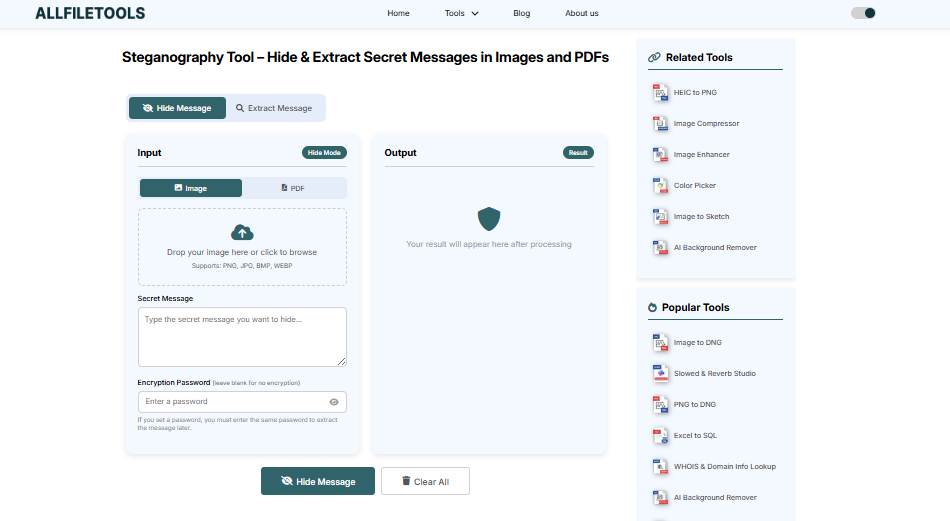
Let’s walk through a real-world scenario. Suppose you want to send a secret password to a friend inside a picture of a cat.
-
Prepare your Secret: Write your message in a
.txtfile or just have it ready to type. -
Choose a High-Quality Image: Use a high-resolution photo (like a 4MB JPEG). The larger the file, the more "noise" it has, making it easier to hide data without distorting the image.
-
Run the Tool: Using a tool like OpenStego, select the cat photo.
-
Add Encryption: Always use a password. Even if someone suspects there is a hidden message, they won't be able to "Extract" it without the key.
-
Save and Send: Your new "Stego-cat" photo is ready. You can email it or upload it to a cloud drive.
How to Extract a Secret Message
Extraction is the reverse process. If you receive a file that you suspect contains a hidden message:
-
Open your steganography software.
-
Select the Extract or Decode option.
-
Upload the suspicious Image or PDF.
-
Enter the pre-agreed password.
-
The software will scan the bits, reconstruct the hidden data, and save it as a readable file on your desktop.
Steganalysis: How Secrets Get Caught
Just as there are tools to hide data, there are "Steganalysis" tools designed to find it. Professionals look for:
-
Statistical Anomalies: If an image has perfectly uniform "noise" in the pixels, it’s a sign that a machine modified it.
-
File Size Discrepancies: If a simple 500x500 pixel image is 10MB, it’s a huge red flag that something is buried inside.
-
Histogram Shifts: Changes in the color distribution of an image can reveal the presence of hidden data.
Critical Tips for Guest Posting & SEO
If you are using this article for a guest post, remember that Google values User Intent. Here is why this article will rank well:
-
Readability: We used simple analogies (safes, spy movies) so a 4th grader or a non-techie can understand.
-
Formatting: Use of headers, bullet points, and bold text makes it "scannable."
-
Keywords: We naturally integrated terms like "LSB method," "Digital Watermarking," and "Steganography Tool" without "keyword stuffing."
Conclusion: The Future of Digital Secrecy
Steganography is no longer just for government agencies or hackers. It is a practical skill for anyone who values their digital footprint. Whether you are protecting your intellectual property with a hidden watermark or sending a private note across an insecure network, hiding data in images and PDFs is an elegant and effective solution.
In a world where everyone is looking, the best way to stay safe is to become invisible.
🔹 Explore more powerful file conversion and online utilities at AllFileTools –
🔹 For technical support, digital solutions, and expert services, visit LetDigitalFly IT Services –
🔹 Discover additional career and productivity resources at Resume Slip Builder –
Leave a Comment
No comments yet. Be the first to comment!