Images are used everywhere, from photography and graphic design to websites, social media, and digital marketing. However, different devices and editing applications support different image formats. If you have a DNG photograph that you want to share online or a JPG image that you need to use in another workflow, choosing the right image converter can make file management easier.
A DNG to JPG converter helps transform Digital Negative (DNG) image files into the widely supported JPG format. Similarly, a JPG to DNG converter allows users to change the file format when a particular workflow requires it. With online file conversion tools, you can manage supported image formats directly through your browser without installing additional desktop software.
Whether you're a photographer, designer, content creator, or everyday computer user, understanding image formats can help you select the right conversion option.
What Is a DNG to JPG Converter?
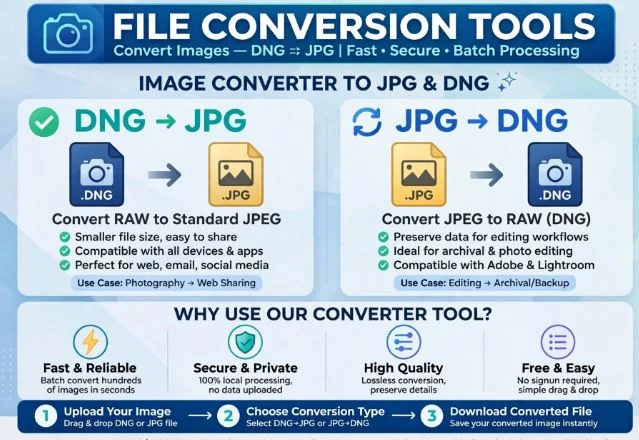
A DNG to JPG converter is an image conversion tool that changes Digital Negative files into JPEG images.
DNG stands for Digital Negative. It is a RAW image format developed by Adobe to provide a standardized way of storing digital camera image data. Photographers often use DNG files when they want greater flexibility during image editing.
JPG, also known as JPEG, is a widely supported image format that uses lossy compression. It is commonly used for websites, social media, digital photography, and everyday image sharing.
Converting DNG to JPG can make photographs easier to view, upload, share, and use across different devices and applications.
How to Convert DNG to JPG Online
If you have RAW photographs saved in DNG format, you may want to convert them into JPG for everyday use.
A browser-based image converter can simplify this process.
Follow these general steps:
-
Open an online DNG to JPG converter.
-
Select or upload your DNG image file.
-
Choose JPG or JPEG as the output format.
-
Start the image conversion process.
-
Wait for the conversion to finish.
-
Download your converted JPG image.
-
Open the image to check its appearance and quality.
The conversion process may include image processing and compression. Depending on the tool, you may also have access to image quality or output settings.
What Is a JPG to DNG Converter?
A JPG to DNG converter changes a JPEG image into a file with the DNG format.
This conversion may be useful when a specific application or file-management workflow requires a DNG container. However, there is an important technical difference between changing a file format and recovering original camera data.
A JPG image has already undergone lossy compression. Converting it into DNG does not restore the original RAW sensor information, recover discarded image details, or turn it into a genuine RAW photograph.
If your goal is professional photography editing, it is generally better to preserve the original RAW or DNG file whenever possible.
How to Convert JPG to DNG Online
You can use a compatible online image conversion tool to change a JPG file into DNG format when that conversion is supported.
The general process is straightforward:
-
Open a compatible JPG to DNG converter.
-
Select the JPG image from your device.
-
Choose DNG as the output format.
-
Start the conversion if the tool supports the required encoding.
-
Download the resulting file.
-
Check whether your intended application can open it.
Always check the converter's actual format support. Not every image converter supports JPG to DNG conversion.
When Should You Use DNG?
DNG is useful when working with RAW photography and editing workflows that benefit from retaining camera image data and greater adjustment flexibility.
When Should You Use JPG?
JPG is a practical choice when you need images that are easy to share, upload, display, and use across websites and digital platforms.
Why Use Online File Conversion Tools?
Online file conversion tools help users manage different file formats without depending on multiple desktop applications.
Here are some common advantages:
Browser-based access: Use compatible conversion tools directly through your browser.
Format flexibility: Change supported image files into formats suitable for different applications.
Simplified workflow: Convert images without navigating complicated editing software.
Convenient sharing: Prepare JPG images for websites, social media, and other digital platforms.
Everyday compatibility: Work with common image formats across supported devices and applications.
Before uploading personal photographs, review the website's privacy policy and understand how uploaded files are processed and stored.
Other Ways to Convert Images Online
Image conversion isn't limited to DNG and JPG. Different projects may require different image formats depending on compatibility, transparency, quality, and file size.
Some commonly used image formats include:
-
PNG: Useful for graphics, transparent backgrounds, logos, and interface elements.
-
WebP: A modern image format designed for efficient web delivery.
-
GIF: Commonly used for simple animations and supported static images.
-
BMP: A bitmap image format used in certain applications and workflows.
-
TIFF: Often used in photography, scanning, printing, and professional image workflows.
-
JPEG: A widely supported format for photographs and online images.
An image converter to JPG can be particularly useful when you need to prepare supported image files for websites, documents, presentations, or social media.
Tips for Choosing the Right Image Converter
Before converting your images, consider these important factors.
Format compatibility: Make sure the tool supports your original image format and the required output format.
Image quality: Check available quality settings and understand whether the conversion uses lossy or lossless compression.
Resolution: Confirm that the output image retains the dimensions you need.
File size: Consider the balance between image quality and storage requirements.
Privacy: Review how the website handles uploaded photographs and whether files are retained after processing.
Device compatibility: Choose a browser-based tool that works with your computer, tablet, or smartphone.
Frequently Asked Questions
1. How can I convert DNG to JPG online?
Open a compatible DNG to JPG converter, upload your DNG image, select JPG as the output format, and start the conversion. Download and check the resulting image.
2. Can I convert JPG to DNG?
Yes, if your selected converter supports JPG to DNG conversion. However, converting JPG into DNG does not recover the original RAW camera data.
3. Does converting DNG to JPG reduce image quality?
JPG uses lossy compression, so some image information may be discarded during conversion. The resulting quality depends on the conversion settings and processing method.
4. Which format is better for photography, DNG or JPG?
DNG is generally more suitable for RAW photography workflows and flexible editing. JPG is more convenient for everyday viewing, sharing, and online publishing.