You bought a new phone and it has no SIM tray. Or an airline told you to "just get an eSIM" for your trip abroad. Either way, you want a clear answer, not jargon. Here is the short version: an eSIM does everything a plastic SIM does, without the plastic. Apple already ships every US iPhone 14 and later without a physical SIM slot, so this is no longer optional tech.
This guide covers what an eSIM is, how it works, how to install one, and when it actually beats a regular SIM. No fluff, just what you need to decide.
What is an eSIM?
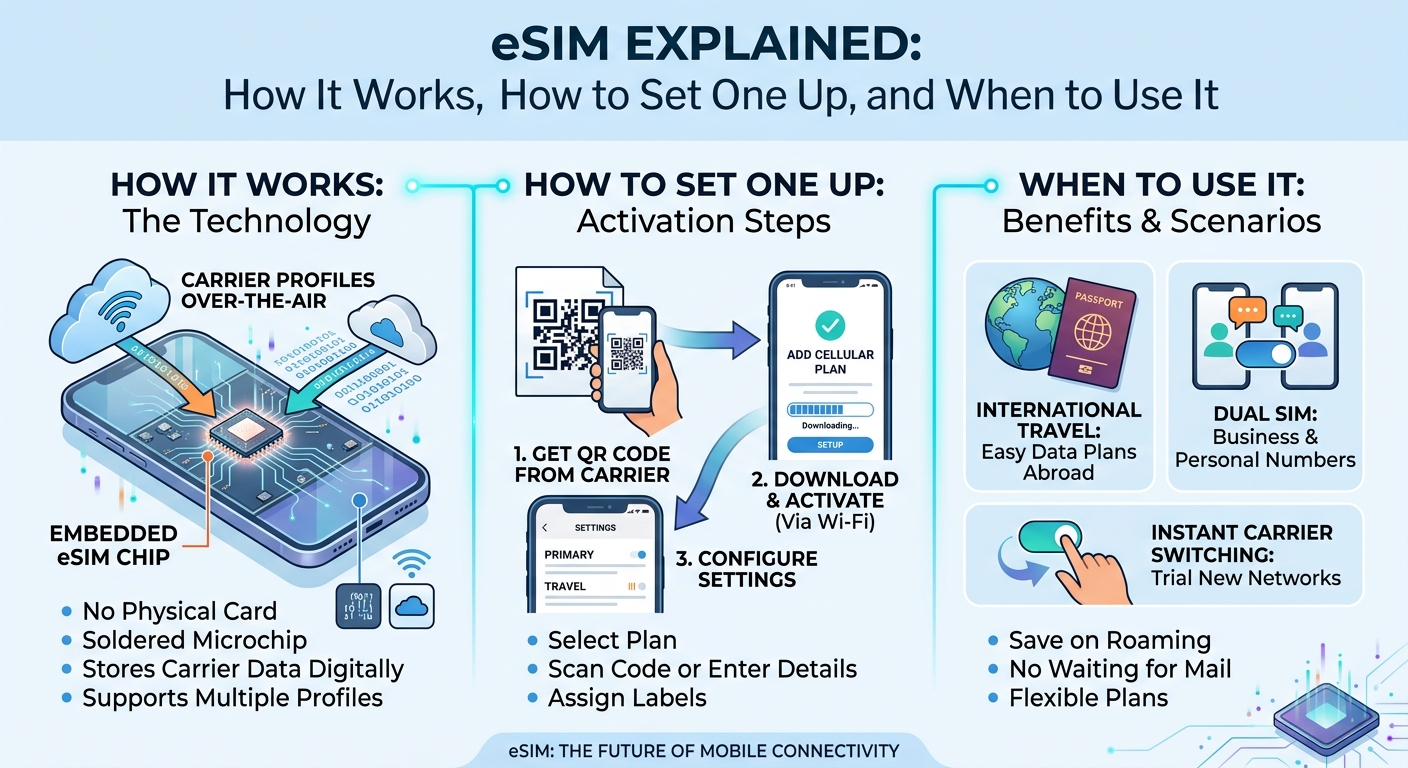
An eSIM is an embedded SIM. It is a small chip soldered directly into your phone at the factory. Instead of swapping a card, you download a mobile plan to that chip as a software profile.
The "e" stands for embedded. You cannot pop it out, and you never need to. That single change removes the tiny tray, the paperclip ritual, and the lost SIM card in the back of a taxi.
Think of it like this. A physical SIM is a house key you carry. An eSIM is a keycard your phone rewrites on demand. One phone, many possible plans, no hardware to handle.
How does an eSIM work?
An eSIM stores your carrier profile digitally. When you buy a plan, the carrier sends a profile that your phone downloads and activates. Your number, data allowance, and network settings all live inside that profile.
Most people install it by scanning a QR code. The code tells your phone where to fetch the profile. Within a minute or two, your phone connects to the network as if you had inserted a card.
Here is what makes it powerful:
- Multiple profiles: Modern phones store several eSIMs and let you switch between them in settings.
- Dual SIM: You can run one physical SIM and one eSIM at the same time, or two eSIMs.
- Remote activation: You can buy and install a plan from your couch, before you even leave home.
eSIM vs physical SIM: which is better?
For daily use at home, both work fine. The real gap shows up when you travel or juggle numbers. My honest take: for anyone who crosses a border, the eSIM wins, and it is not close.
- Speed: A physical SIM means finding a store abroad. An eSIM activates in minutes online.
- Cost: eSIM travel plans usually undercut carrier roaming fees by a wide margin.
- Backup: Keep your home number active on the physical slot while a travel eSIM handles data.
- Security: You cannot lose or damage a chip that is soldered inside the phone.
The one advantage a physical SIM still holds is flexibility across old devices. If your phone is more than a few years old, it may not support eSIM at all.
How to set up an eSIM in under 5 minutes
The process is nearly identical on iPhone and Android. Have your plan or QR code ready, then follow these steps.
- Connect to Wi-Fi. The profile downloads over the internet, so a stable connection helps.
- Open Settings, then Cellular or Mobile Network.
- Tap Add eSIM or Add Data Plan.
- Scan the QR code your provider sent, or enter the details manually.
- Label the plan, for example "Travel," so you can tell profiles apart later.
- Choose which line handles calls, texts, and data.
That is it. Install it a day before you fly, then flip it on when you land. While you are prepping, it also helps to digitize your itinerary and boarding passes with a free PDF compressor so the files load fast even on a weak signal.
When an eSIM makes the most sense
An eSIM is not only for globe-trotters, though travel is its best use case.
- International trips: Land, connect, and skip the airport SIM kiosk entirely.
- Two numbers, one phone: Keep work and personal lines separate without carrying two devices.
- Short-term data needs: Buy a plan for a week or a month and let it expire on its own.
- New phone setup: Transfer your carrier profile digitally instead of waiting for a mailed card.
Buying an eSIM for travel
For trips abroad, a dedicated travel eSIM is usually the smartest buy. These plans are built for tourists, cover 190 or more countries, and activate before departure. You pick a destination, choose a data amount, and get a QR code by email within minutes.
Providers such as Holafly sell country and regional plans, including unlimited-data options that appeal to heavy users who stream maps and video on the road. Compare the data cap, validity period, and whether tethering is allowed before you pay, since those three details decide real value.
One tip from experience: buy from a provider that shows exact coverage per country. Vague "worldwide" promises often hide gaps in the exact places you plan to visit.
Do all phones support eSIM?
Most flagship phones from the last few years do, but not every model. Support depends on the device and, sometimes, the region it was sold in.
- iPhone: Every iPhone from the XS and XR onward supports eSIM. US iPhone 14 models and later are eSIM only.
- Google Pixel: Supported from the Pixel 3 onward in most markets.
- Samsung Galaxy: Supported on the Galaxy S20 series and later, plus recent foldables.
To check quickly, look for an "Add eSIM" option in your cellular settings. If it is there, your phone is ready.
Frequently asked questions
Can I keep my phone number when I use an eSIM?
Yes. A travel eSIM handles data on a separate line, so your home number stays active on your physical SIM. You can also transfer your existing number to an eSIM if your carrier supports it.
Does an eSIM work without Wi-Fi?
You need internet only to download the profile the first time. After activation, the eSIM connects to mobile networks on its own, no Wi-Fi required.
Can I use two eSIMs at once?
On most recent phones, yes. You can store several profiles and keep two active at the same time, choosing which one handles data and which handles calls.
What happens to my eSIM when the plan expires?
The profile stays on your phone but stops working once data or validity runs out. You can delete it or top it up, depending on the provider.
Is an eSIM safe?
It is at least as safe as a physical SIM, arguably safer. A thief cannot remove it to bypass your lock screen, and remote wipe features still protect your data if the phone is lost.
The bottom line
An eSIM removes the last piece of removable hardware from your phone and replaces it with a flexible digital plan. For home use it is a quiet upgrade. For travel it is a genuine money-saver that turns airport SIM hunts into a one-minute download. If your phone supports it, there is little reason to keep chasing plastic cards.