What Is Electronic Software Distribution?
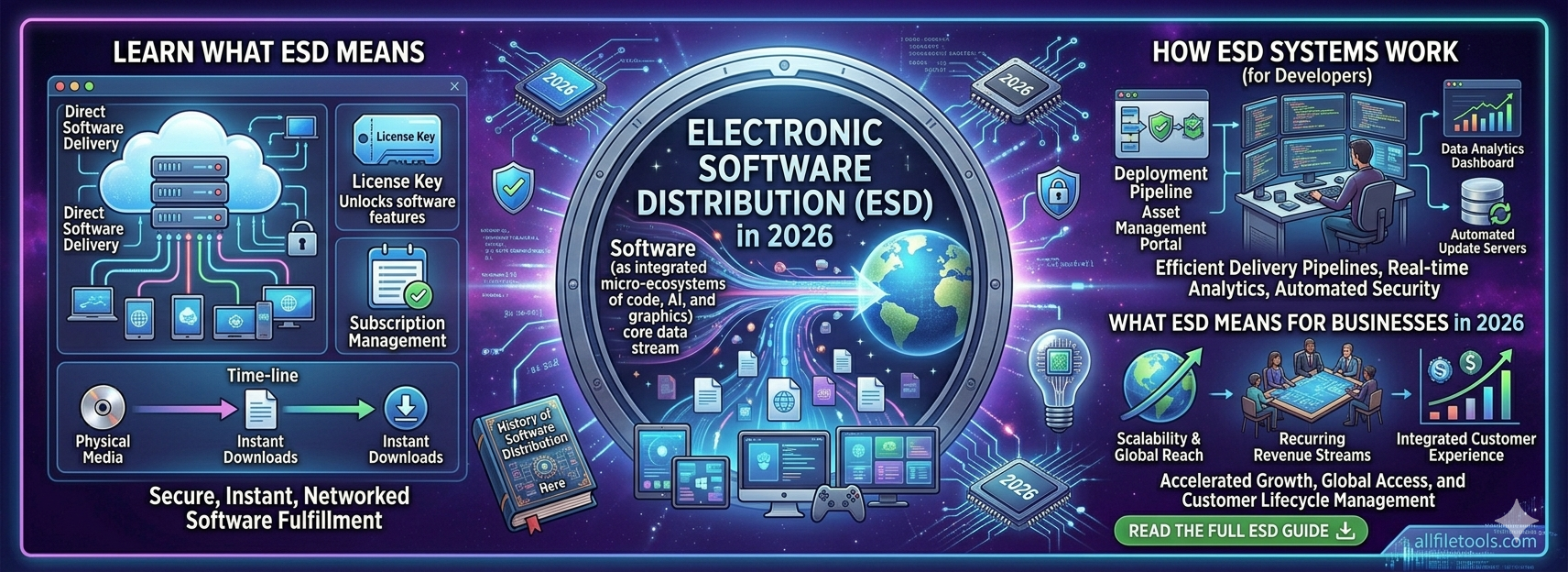
Electronic software distribution (ESD) is the delivery of software over a network — most commonly the internet — rather than through physical media like CDs, DVDs, or USB drives.
The core idea is straightforward: instead of pressing software onto a disc and shipping it to a store or a customer, the software is hosted on a server and downloaded on demand. The purchase, delivery, installation, and updates all happen digitally, without any physical product changing hands.
In practice, ESD covers a wide range of delivery patterns:
- A user downloading an app from the Mac App Store or Google Play
- A developer running
npm installto pull a package into a project - A CI/CD pipeline automatically deploying a new build to a production server
- A gaming platform pushing an overnight patch to millions of users simultaneously
- An enterprise IT team pushing a software update to thousands of company machines via a management platform
All of these are ESD — they operate at different scales and serve different audiences, but the principle is the same: software delivered electronically, on demand, over a network.
What Is an Electronic Software Distribution System?
An electronic software distribution system is the infrastructure, platform, and set of processes that make ESD delivery possible at scale. It's not just the act of hosting a file for download — it's the full stack of tools and workflows that handle how software is packaged, authenticated, delivered, updated, and tracked.
A complete electronic software distribution system typically includes:
1. Hosting and Content Delivery
The software files themselves need to be stored and served reliably. Most ESD systems use Content Delivery Networks (CDNs) — distributed server networks that serve files from locations geographically close to the user, reducing download times and handling high traffic volumes without bottlenecks.
2. Authentication and Licensing
ESD systems manage who is entitled to download and use software. This includes licence key generation, account-based entitlements, trial period enforcement, and subscription status verification — all handled automatically at the point of download or activation.
3. Code Signing and Integrity Verification
A trustworthy ESD system signs all distributed software with a verified certificate, so the operating system and the user can confirm the file hasn't been tampered with since it left the publisher. Alongside this, checksums (SHA-256 or SHA-512 hashes) are published so users can independently verify file integrity before installation.
4. Update and Patch Management
One of the biggest advantages of ESD over physical distribution is the ability to push updates automatically. A modern ESD system includes an update mechanism that checks for new versions, downloads patches, and applies them — often without any user action required.
5. Analytics and Reporting
ESD systems track downloads, activation rates, geographic distribution, version adoption, and error rates. This data feeds directly into product development — teams can see how quickly users adopt a new version, where downloads are failing, and which regions have the highest uptake.
6. Enterprise Management Layer
For organisations distributing software internally across large fleets of devices, the ESD system includes a management console where IT administrators can push specific versions, enforce policies, track compliance, and roll back updates if needed. Platforms like Microsoft Endpoint Manager (Intune) and Jamf are examples of enterprise-grade ESD systems.
ESD Electronic Software Distribution: How the Abbreviation Is Used
The abbreviation ESD — standing for electronic software distribution — is used consistently across the software industry, though you'll encounter it in a few distinct contexts:
In retail and consumer software: ESD refers to digital purchases of software that was previously sold in physical boxes — a licence key or download link delivered by email instead of a DVD in a box. Microsoft Office, Adobe Creative Cloud, and most major consumer software titles are now sold as ESD.
In enterprise IT: ESD refers to the systems and platforms used to deploy and manage software across an organisation's device fleet. In this context, an "ESD solution" is the platform (like Intune or SCCM) rather than just the act of downloading.
In development: ESD describes the full continuous delivery pipeline — how code moves from a developer's machine through testing, building, and deployment to end users. CI/CD pipelines are essentially automated ESD systems built into the development workflow.
Understanding which context "ESD" is being used in usually comes down to who's talking: a retail customer, an enterprise IT manager, or a software development team.
Electronics Distribution Software vs Electronic Software Distribution: What's the Difference?
These two terms look similar but mean different things — a distinction worth clarifying.
Electronic software distribution (this article's topic) is about how software is delivered — the process of distributing digital software products to end users over a network.
Electronics distribution software typically refers to software used to manage the distribution of physical electronics products — inventory management systems, supply chain platforms, and logistics tools used by companies that manufacture or wholesale electronic components and hardware (semiconductors, circuit boards, consumer electronics). Companies like Digi-Key, Mouser, or Arrow Electronics use electronics distribution software to manage their physical supply chains.
If you searched for "electronics distribution software" and landed here, the two terms are easy to confuse. The core difference: one is about distributing software digitally; the other is software used to manage physical electronics distribution businesses.
How ESD Replaced Physical Media
The shift from physical to digital software distribution happened gradually through the 1990s and 2000s, then accelerated sharply as broadband internet became widely available and fast enough to make large software downloads practical.
In the era of physical distribution, buying software meant:
- Going to a retail store or ordering from a catalogue
- Waiting days or weeks for postal delivery
- Managing physical licence keys, installation discs, and product manuals
- Contacting the publisher separately to obtain updates — often paying for them as a new version
ESD eliminated every one of those steps. The advantages for both publishers and users were significant enough that adoption was essentially complete within a decade:
For publishers: No manufacturing, packaging, or shipping costs. Instant global reach from day one. Ability to update software without user action. A direct relationship with end users including usage data.
For users: Instant access after purchase. Automatic updates. No physical media to lose or damage. Access from any device with an internet connection.
The Main ESD Channels in Use Today
Electronic software distribution happens through several distinct channels, each serving a different audience and use case.
Consumer App Stores
Apple's App Store, Google Play, and the Microsoft Store are the dominant ESD platforms for consumer software. They handle discovery, payment, delivery, and updates in a single ecosystem in exchange for a revenue percentage. For mobile apps especially, these stores are the only realistic distribution path for most developers.
Developer Package Registries
npm (JavaScript), PyPI (Python), Maven (Java), and similar registries are ESD systems purpose-built for developers. A single npm install command retrieves, verifies, and installs a package along with all its dependencies in seconds — this is ESD operating at its most frictionless.
Direct Download and Browser-Based Tools
Many software products are distributed directly from the publisher's website, either as a downloadable installer or as a fully browser-based application. Tools like AllFileTools.com represent the furthest point on this spectrum — the software runs entirely in the browser with nothing to install, update, or manage at all.
Enterprise ESD Systems
Organisations managing large device fleets use enterprise ESD platforms to push software and updates across thousands of machines with centralised control. Microsoft Intune, Jamf, and SCCM are common examples in this space.
CI/CD Pipelines
For development teams, automated deployment pipelines are a form of ESD: code changes are built, tested, and deployed to production environments automatically, often within minutes of being merged. This is ESD at its most continuous — users receive updates without anyone manually triggering a release.
Security Considerations in Electronic Software Distribution
The convenience of ESD introduces security responsibilities that both users and publishers need to take seriously.
For Users: Verify What You Download
Not all download sources are legitimate. Fake download pages, typosquatted package names, and modified installers are common attack vectors in the ESD ecosystem. Before installing software from any unfamiliar source:
- Check the publisher's official website for the canonical download link — don't rely on third-party download sites
- Verify the file hash (SHA-256 or SHA-512) against the checksum published by the developer
- Use established ESD channels (App Store, npm, PyPI) where possible, as they perform baseline malware scanning
You can verify file integrity using a hash tool directly in your browser — the AllFileTools Hash Generator supports SHA-256, SHA-512, MD5, and SHA-1 verification with no file upload and no account required.
For Publishers: Build Trust Into Your ESD System
A trustworthy electronic software distribution system should:
- Code-sign all releases so operating systems can confirm authenticity at installation
- Publish checksums alongside every download link so users can independently verify files
- Serve all downloads over HTTPS — plain HTTP downloads are trivially interceptable
- Scan dependencies regularly for known vulnerabilities, particularly for packages distributed through registries
The Supply Chain Risk
One of the most significant ESD security challenges is software supply chain attacks — where malicious code is introduced into a legitimate package or dependency rather than the final application. The npm ecosystem has seen multiple high-profile incidents of this type.
Mitigations include dependency pinning, lockfiles, automated vulnerability scanning (tools like Snyk or Dependabot), and regular audits of all packages a project depends on.
What a Modern ESD Pipeline Looks Like in Practice
For a typical web application or SaaS product in 2026, the electronic software distribution system might work like this:
- A developer merges a pull request into the main branch
- A CI system (GitHub Actions, GitLab CI, CircleCI) automatically runs tests
- On passing, the build is packaged and pushed to a container registry or object storage
- A deployment system (Kubernetes, Render, AWS ECS) pulls the new build and rolls it out with zero downtime
- Monitoring tools confirm the new version is performing correctly
- Users are already running the updated version — no action required on their end
The entire process, from code merge to live deployment, often takes under 15 minutes. That's an electronic software distribution system operating at the speed modern development demands.
Key Takeaways
- Electronic software distribution (ESD) is the delivery of software over networks rather than physical media — covering everything from App Store purchases to npm packages to automated CI/CD deployments.
- An electronic software distribution system is the full infrastructure stack: hosting, authentication, code signing, update management, analytics, and enterprise controls.
- ESD as an abbreviation is used in retail, enterprise IT, and development contexts — the meaning is consistent but the scale and tooling differ.
- Electronics distribution software is a different category — software used to manage the physical supply chains of electronics hardware companies, not digital software delivery.
- Security matters in every ESD context: verify downloads with hash checks, sign your releases, and audit your dependencies.
Free Developer Tools for Your Distribution Workflow
AllFileTools.com offers 32 free, browser-based developer tools — no installation, no account, no data sent to a server. Useful across any ESD workflow:
- Hash Generator — Verify SHA-256, SHA-512, MD5, and SHA-1 checksums of downloaded or distributed files before installation
- Base64 Encoder/Decoder — Encode or decode tokens, API keys, and configuration values used in distribution pipelines
- JSON Formatter — Validate and format API responses, manifest files, and deployment configs
- URL Encoder/Decoder — Debug query strings and API parameters in download or activation endpoints