This guide covers four practical classification methods, when to use each, and how to apply them to real projects.
Why Classification Matters Before You Write a Single Line
Most teams skip component classification until the system is already large enough to cause problems. By then, it's expensive to fix.
Classifying components early does three concrete things:
It forces architectural decisions upfront. When you have to label something — is this business logic or infrastructure? — you're forced to decide where it belongs before you've coupled it to everything else.
It makes onboarding dramatically faster. A developer who can look at a diagram and immediately understand that OrderService is business logic, OrderRepository is data access, and EmailNotifier is an integration component can start contributing without a two-hour walkthrough.
It reduces the cost of change. Well-classified systems make it obvious what a change affects. Poorly classified systems make every change a potential landmine.
Method 1: Classify by Architecture Layer
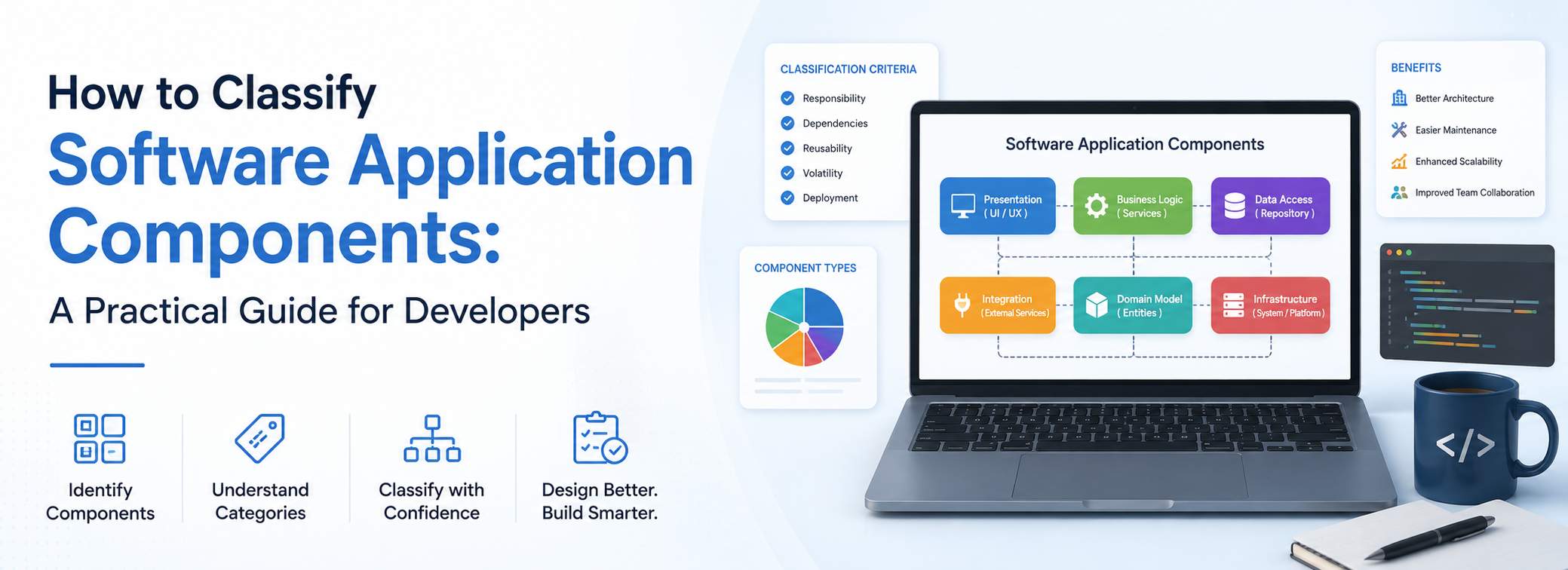
The most widely used classification method divides components into horizontal layers, each responsible for a distinct concern. This is the foundation of the N-Tier and MVC patterns you'll encounter across most modern frameworks.
Presentation Layer Everything the user sees and interacts with. Forms, buttons, navigation menus, dashboards, mobile screens. The rule: presentation components display data and capture input — they don't make business decisions.
A login screen is a presentation component. Whether a login attempt is valid is not its job.
Business Logic Layer The brain of the application. This layer processes input, applies rules, makes decisions, and orchestrates what happens next. A payment validation engine, a loan approval algorithm, a recommendation system — these live here.
Well-designed business logic is independent of both the UI and the database. If you can change how data is stored without rewriting your business rules, your layers are clean.
Data Access Layer Components that read from and write to persistent storage — databases, file systems, caches. They translate between what the business logic needs and what the storage system understands.
Separating data access means you can change your database engine — from PostgreSQL to MongoDB, say — by rewriting one layer, not the entire application.
Integration Layer Components that communicate with external systems: third-party APIs, payment gateways, email services, cloud storage, authentication providers. These are deliberately isolated so that when an external service changes its API (and it will), the blast radius is contained.
Method 2: Classify by Functional Role
Layered architecture tells you where a component sits. Functional classification tells you what job it actually does. These two lenses complement each other.
Core Components Components that deliver the primary value of the application. Without them, the app cannot do its main job. In a video streaming platform, the video player is core. In an invoicing tool, the invoice generator is core.
Ask: If this component disappeared, would the application still do the thing it exists to do? If not, it's core.
Supporting Components Components that assist core functionality without defining it. A notification system, an audit logger, a reporting module. These matter, but they don't constitute the application's reason to exist.
Supporting components often have a key property: they're reusable across multiple systems. A logging library that writes structured JSON is supporting in your e-commerce platform — and also in your analytics dashboard, your admin tool, and your mobile app.
Infrastructure Components Components that keep everything running: servers, container orchestration, CI/CD pipelines, monitoring agents, load balancers. These are often overlooked in component classification because they don't contain business logic — but they're the foundation everything else rests on.
Infrastructure components are especially important to classify clearly because they're usually the domain of a different team (DevOps or platform engineering) and follow different change management processes than application code.
Method 3: Classify by Deployment Architecture
How a component is deployed affects how it's built, tested, scaled, and maintained. As cloud-native development has matured, deployment-based classification has become increasingly important.
Monolithic Components All application logic bundled and deployed as a single unit. Simpler to develop and deploy in early stages. Becomes harder to scale and change as the system grows, since all components share a single deployment boundary.
Microservice Components Independently deployable services, each responsible for a specific business capability. An e-commerce system might have separate services for inventory, payments, user authentication, and shipping — each deployable without touching the others.
The trade-off: microservices reduce deployment coupling but increase operational complexity. More services means more network calls, more observability requirements, and more coordination overhead.
Serverless Functions Event-driven components that execute a specific task without managing infrastructure. Ideal for lightweight, infrequent operations: resizing an uploaded image, sending a transactional email, processing a webhook. They scale automatically and cost nothing when idle.
Shared Libraries and Packages Code that multiple applications depend on, distributed as a versioned package rather than a deployed service. A company's internal authentication library, a shared UI component kit, a data validation utility. Classification matters here because changes to shared libraries have wider blast radii than changes to a single microservice.
Method 4: Classify by Technical Concern
Beyond layers and roles, components can be grouped by the technical problem they address. This is most useful when building the cross-cutting parts of a system that don't fit neatly into one layer.
- Security components — authentication, authorisation, encryption, token validation
- Observability components — logging, metrics collection, distributed tracing, alerting
- Configuration components — feature flags, environment management, secrets handling
- Caching components — in-memory caches, CDN layers, database query caches
- Messaging components — message queues, event buses, pub/sub systems
These components typically appear across multiple layers. A logging library is used in business logic, data access, and integration layers simultaneously. Classifying them by technical concern prevents them from being awkwardly forced into one layer where they don't really belong.
A Practical Step-by-Step Approach
Putting this into practice doesn't require an architecture team or a lengthy planning phase. Here's a lightweight process that works for projects of any size:
Step 1 — Inventory what exists. List every module, service, library, and script in the project. Don't skip infrastructure or shared utilities.
Step 2 — Apply the functional question first. For each item: is this core, supporting, or infrastructure? This immediately creates three buckets and surfaces what the application is actually for.
Step 3 — Apply layered classification within each bucket. For core and supporting components, determine which layer they belong to: presentation, business logic, data access, or integration.
Step 4 — Note deployment boundaries. Which components are deployed together? Which are independent? This identifies coupling you may not have been aware of.
Step 5 — Name components to reflect their classification. UserAuthService, OrderRepository, ProductListView, PaymentGatewayAdapter — names that communicate both role and layer make a codebase self-documenting at a glance.
Step 6 — Keep it current. Classification isn't a one-time exercise. As systems evolve, components migrate between categories. A supporting component becomes core. A monolith gets broken into microservices. Review your classification map whenever the system changes significantly.
Key Takeaways
- Layer-based classification (presentation, business logic, data access, integration) is the most universally applicable starting point and the foundation of most established architectural patterns.
- Functional classification (core, supporting, infrastructure) answers a different question — not where something sits, but why it exists.
- Deployment classification (monolithic, microservice, serverless, shared library) determines how components are built, scaled, and changed.
- Technical concern classification handles the cross-cutting components that span multiple layers.
- The most maintainable systems use all four lenses together — and reflect the classification in naming conventions, documentation, and architecture diagrams.
Free Tools for Developers Working on Software Architecture
When you're building, documenting, or reviewing software systems, file conversion and data handling tasks add friction to every workflow. AllFileTools.com offers 32 free, browser-based developer tools — no installation, no account required.
Useful for software development workflows:
- JSON Formatter & Validator — Validate API contracts, configuration files, and data exchange formats between components
- CSV to JSON — Convert between data formats when integrating components across different systems
- Hash Generator — Verify integrity of shared libraries, packages, and build artefacts
- Base64 Encoder/Decoder — Handle encoded tokens, credentials, and payloads across integration components
- Markdown to HTML — Convert architecture documentation for web publishing or internal wikis EOF