Growth does not usually break a service business all at once. It exposes every small gap the team was previously able to work around.
When a service business is small, the team can run surprisingly well on memory. One person knows which technician is closest. Someone remembers that a customer is waiting for an estimate. A handwritten note on the desk is enough to remind the office to send an invoice.
Then the business grows. More calls come in. More technicians join. Jobs overlap. Customers expect faster updates. The same informal habits that once felt flexible begin to create missed appointments, repeated questions and unpaid work.
This is the point where field service management stops being a software category and becomes an operating need. It gives the business one clear way to manage work from the first customer request to the final payment.
What Is Field Service Management?
Field service management is the process of coordinating work performed away from a company office. It covers the people, schedules, customer information, job details, equipment, communication and payments required to deliver a service at a customer location.
For an HVAC company, that may mean assigning an urgent repair to the right technician and making sure the equipment history is available on arrival. For a cleaning, plumbing, roofing, lawn care or pool service business, the details differ, but the operational question is the same: can everyone see what needs to happen next?
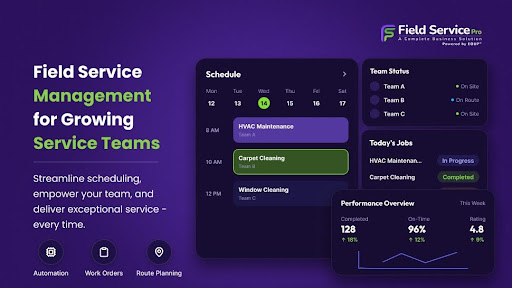
Modern field service software brings those moving parts into one system. It can connect online booking, estimates, scheduling, dispatching, job forms, customer communication, invoices, payments and reporting. The goal is not to put more screens in front of the team. The goal is to remove the daily guessing.
The Real Problem Is Not the Number of Jobs
Most owners first notice the pressure as a scheduling problem. The calendar is full, technicians are calling the office for details and dispatch changes happen throughout the day. But a crowded schedule is usually only the visible part of a larger issue.
The real problem is that information is scattered. The booking may be in one system, the customer message in another, the job notes in a spreadsheet and the invoice in an accounting tool. Every handoff depends on someone copying information correctly and remembering to do it on time.
Growth adds more handoffs. More handoffs create more chances for work to be delayed, repeated or missed. A good field service management system creates a shared record that moves with the job, so the next person does not have to reconstruct what happened before.
What Field Service Management Changes Day to Day
1. The office can schedule with real information
Scheduling becomes easier when dispatchers can see technician availability, job location, expected duration and required skills in one place. When an urgent request arrives, the team can adjust the plan without relying on a chain of calls and messages.
2. Technicians arrive prepared
A mobile app can give field teams access to customer details, service history, job instructions, forms, photos and estimates before they reach the site. That reduces calls back to the office and helps technicians complete more work on the first visit.
3. Customers are not left wondering
Customers remember the silence between booking and arrival. Automated confirmations, reminders and status updates make the service feel organized without asking the office to write every message manually. A client portal can also give customers a direct place to review documents, appointments and invoices.
4. Completed work reaches billing faster
When job details, time, materials and approvals are captured in the same workflow, the invoice does not have to wait for paperwork to return to the office. Faster billing shortens the gap between doing the work and getting paid.
5. Owners can see where operations are slipping
A busy team can look productive while margins quietly weaken. Job reports and job costing help owners see which services take longer than expected, where repeat visits occur and whether capacity is being used well. That turns operational decisions into something stronger than instinct.
When Does a Service Business Actually Need It?
There is no magic team size. Some businesses feel the strain with three technicians. Others stretch manual systems further. The better signal is how often the team depends on memory, repeated data entry and last-minute clarification.
|
|
|
|
|
|
|
|
|
|
|
|
|
|
|
|
|
|
If several of these problems are familiar, the business is already paying for the absence of a system. The cost simply appears as lost time, avoidable travel, delayed invoices, frustrated customers and management attention.
Field Service Management Is Bigger Than Dispatch
Some products treat field service management as a calendar with work orders attached. Scheduling matters, but growing service teams need more than a place to move appointments around.
A service business begins before the job is scheduled and continues after the technician leaves. Leads need a response. Estimates need approval. Customers need reminders. Repeat services need to be booked. Invoices need to be collected. Past customers may need follow-up.
This is why FieldServicePro connects job management with CRM, sales, marketing, communication and billing. The job should not disappear into a gap every time responsibility moves from one part of the business to another. One connected workflow gives the team a clearer view of the full customer relationship, not only today's appointment.
The Pricing Question Growing Teams Should Ask
Software cost is not only the number shown on the pricing page. A low starting price can rise quickly when a business is charged for every dispatcher, manager and technician. That creates a strange penalty: the software becomes more expensive precisely when the team is growing and needs it most.
When comparing field service pricing, look beyond the base subscription. Check user limits, mobile access, onboarding, support, job or visit limits, marketing capacity, payment fees and the features that require add-ons.
FieldServicePro takes a flat-rate approach with unlimited users on both plans. The Starter plan is listed at $199 per month for up to 600 service visits, while the Growth plan is $299 per month for up to 1,000 service visits. Both include unlimited jobs, scheduling, dispatching, estimates, invoicing and mobile access for technicians. This makes the cost easier to understand as the team expands.
How to Choose the Right Field Service Software
A long feature list can make every product look complete. A better evaluation starts with the work your team struggles to control today.
- Map one real job from enquiry to payment. Ask the vendor to show every step, including a schedule change, technician update and customer approval.
- Test the mobile experience. Field staff should be able to find what they need quickly, even on a busy day.
- Check how information moves. Customer details, job notes, estimates and invoices should stay connected without repeated entry.
- Calculate the price at your next team size, not only your current one.
- Ask what setup and support include. Useful software still needs a practical rollout plan.
The strongest test is simple: does the system reduce the number of things your team must remember? If it only digitizes the same confusion, it will become another tool people work around.
Growth Should Create Capacity, Not More Chaos
A growing service business does not need software because paper, spreadsheets or group chats are always bad. It needs software when those methods stop giving the team a shared view of the work.
Field service management creates that view. It helps the office plan, helps technicians arrive prepared, keeps customers informed and moves completed work toward payment. Most importantly, it gives the business a repeatable way to operate as more people and more jobs are added.
The value is not a cleaner dashboard. It is a day with fewer calls asking where the information is, fewer customers waiting for an answer and fewer jobs depending on one person's memory.